一键为 Claude Code 换上新风格,
并提供一整套按需开启的功能。
Re-skin Claude Code in one click, with a full set of features you turn on when you need them.
21 套风格,终端和桌面 App 都能用。21 styles for the terminal and the desktop app.
- 16 个 mod16 mods
- 21 套风格21 styles
- 终端 + 桌面 AppTerminal + desktop app
- MIT
lemo-mod 是什么What is lemo-mod
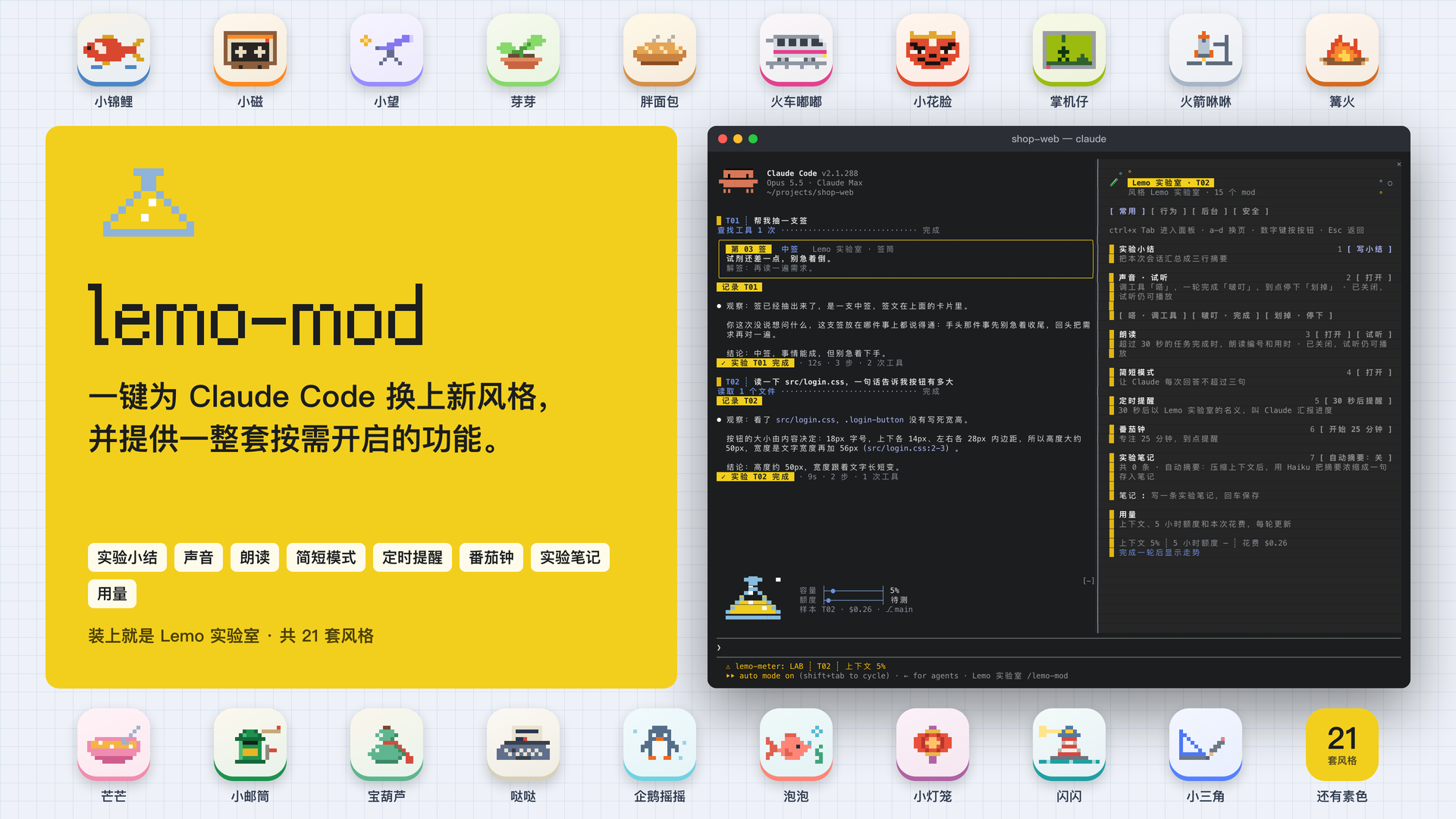
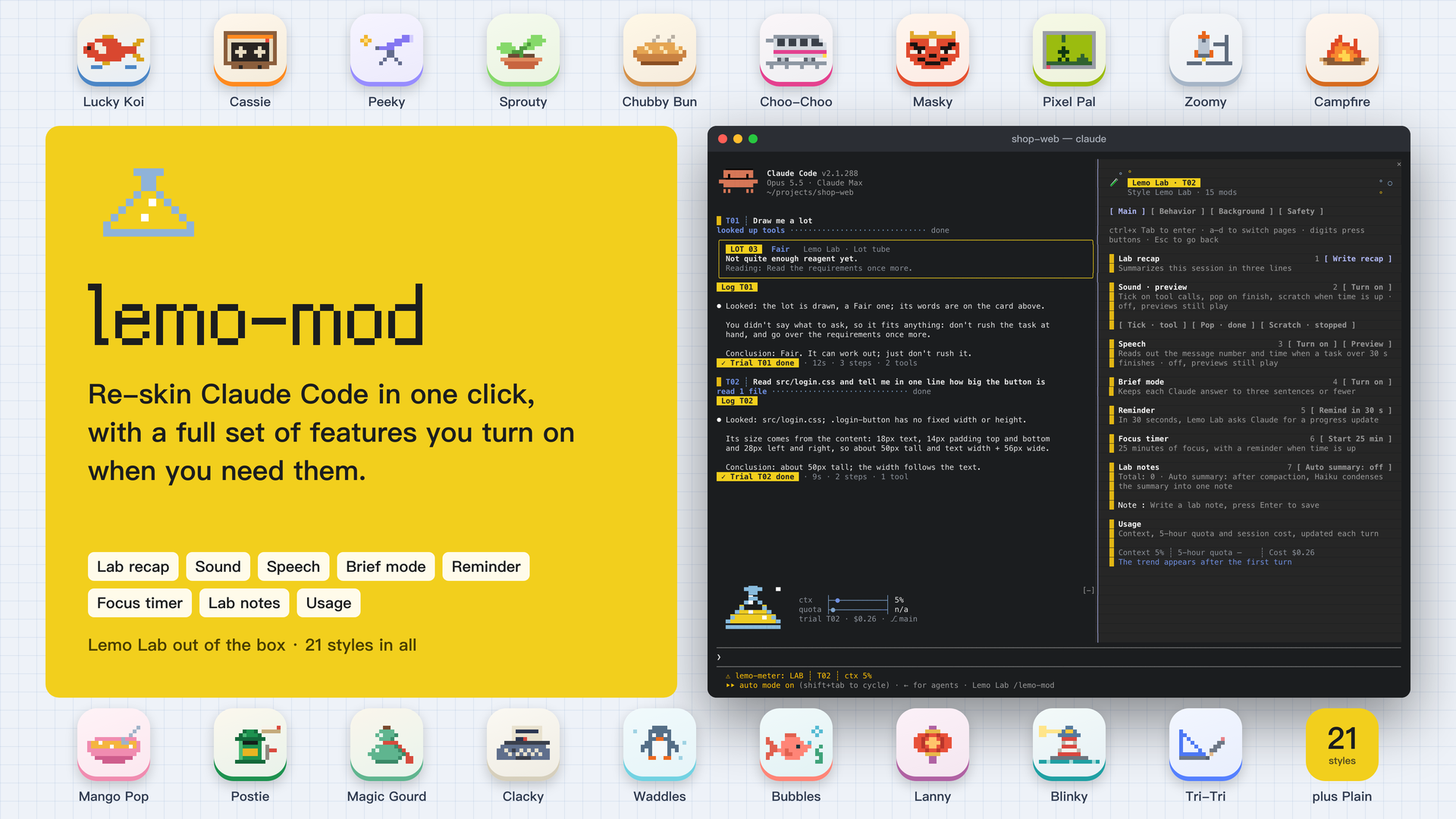
lemo-mod 是一组基于 Claude Code 官方 mod 接口的风格化 mod。装上之后,终端里的 Claude Code 和桌面 App 的 Code 标签都能一键换风格,配色、像素小画、加载词、音效和名字一起换。lemo-mod is a set of style mods built on Claude Code's official mod interface. Once installed, Claude Code in the terminal and in the desktop app's Code tab can switch styles in one click. Colors, pixel mascot, spinner words, sounds and names all change together.
除了外观,lemo-mod 还提供一整套功能,包括四页面板、用量横条、状态栏、音效、朗读、番茄钟、笔记、会话小结、抽签工具和一个只读助手。你的设置只读不改,外观以外的功能都由你自己开启。Beyond looks, lemo-mod provides a full set of features, including a four-page panel, a usage band, a status line, sounds, speech, a focus timer, notes, session recaps, a lot-drawing tool and a read-only assistant. Your settings are only read, never changed, and every feature beyond looks is yours to turn on.
21 套风格21 styles
20 套主题风格各有自己的配色、像素小画、加载词、音效和名字,另有一套素色。点一套,看它在终端和桌面 App 里的浅色与深色效果。20 themed styles each have their own colors, pixel mascot, spinner words, sounds and names, plus Plain. Pick one to see it in the terminal and the desktop app, light and dark.
装上以后What you get
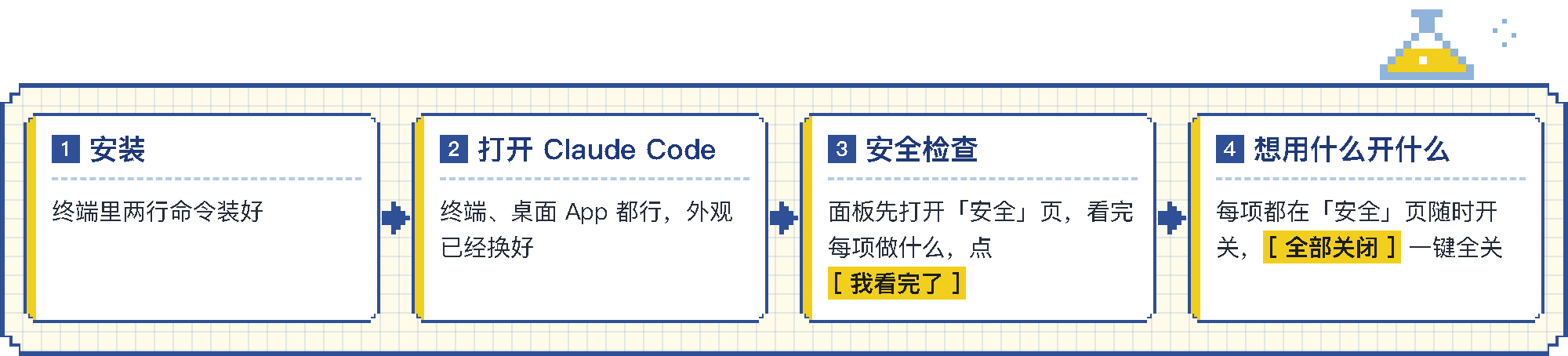
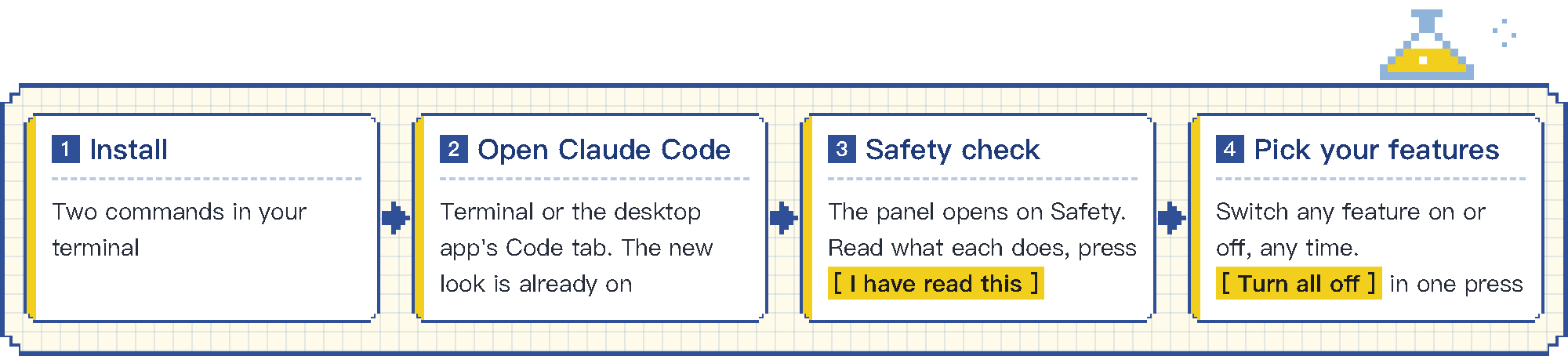
- 安装Install终端里两行命令装好Two commands in your terminal
- 打开 Claude CodeOpen Claude Code终端、桌面 App 都行,外观已经换好Terminal or the desktop app's Code tab. The new look is already on
- 安全检查Safety check面板先打开「安全」页,看完每项做什么,点 [ 我看完了 ]The panel opens on Safety. Read what each does, press [ I have read this ]
- 想用什么开什么Pick your features每项都在「安全」页随时开关,[ 全部关闭 ] 一键全关Switch any feature on or off, any time. [ Turn all off ] in one press
外观装上就开Looks are on from the start
- 你的每条消息带上
T01、T02这样的编号,Claude 的回复标明对应哪一条Your messages get numbers likeT01andT02, and each reply shows which one it answers - 工具行、耗时行和加载词换成风格样式Tool rows, turn lines and spinner words take on the style
- 输入框上方的横条显示上下文、5 小时额度、花费和 git 分支,下方是状态栏A band above the prompt shows context, the 5-hour quota, cost and git branch, with a status line below
- Claude 的提问弹窗加上标题Claude's question dialog gets a header
/lemo-mod面板共四页,分别是常用、行为、后台和安全A four-page/lemo-modpanel with Main, Behavior, Background and Safety
其余的,想用再开The rest, when you want it
- 开关switch
- 装上时关着,可在安全页随时开关Off at install. Turn it on or off on the Safety page at any time
- [ 手动触发 ][ on demand ]
- 只在你点按钮或输入命令时运行Runs only when you press its button or type its command
- 提示音Sounds
调用工具和一轮结束时播放风格音效Style sounds on tool calls and turn ends
开关 · 音效switch · sound - 朗读Speech
长任务结束时朗读编号和用时Reads out the message number and time when a long task ends
开关 · 朗读switch · speech - 简短模式Brief mode
每次回答不超过三句Answers in three sentences or fewer
开关 · 附加提示switch · adds to prompt - 记录口吻Notebook voice
首行说明看了什么,末行给出结论Opens with what it looked at and ends with a conclusion
开关 · 附加提示switch · adds to prompt - 限时Time limit
单轮工作超时自动中止Stops a turn that runs over time
开关 · 代你操作switch · acts for you - 日志Log
每轮一行,写进
开关 · 写文件switch · writes a file~/.claude/lemo-mod/journal.mdOne line per turn in~/.claude/lemo-mod/journal.md - 自动分类Auto tags
给每条消息标上提问、改代码、排查或闲聊Tags each message as question, code, debug or chat
开关 · 额外用量 · 消息开头发给小模型switch · extra usage · message start goes to a small model - 压缩后自动摘要Auto summary after compaction
压缩上下文后存一句笔记Saves a one-line note after each compaction
开关 · 额外用量 · 压缩摘要发给小模型switch · extra usage · summary goes to a small model - 抽签工具Lot tool
说「抽支签」,Claude 就抽一支Say “draw a lot” and Claude draws one
开关 · 新增工具switch · adds a tool - 编号说明Numbering note
告诉 Claude
开关 · 附加提示switch · adds to promptT03指的是哪一条Tells Claude whatT03refers to - Claude 可派助手Claude can send the assistant
允许 Claude 自己派只读助手Lets Claude send the read-only assistant
开关 · 额外用量 · 报告进入对话switch · extra usage · report joins the chat - 会话小结Session recap
把本次会话汇总成三行摘要Sums up this session in three lines
[ 手动触发 · 主模型读整段对话 ][ on demand · main model reads the chat ] - 定时提醒Reminder
N 秒后请 Claude 汇报进度Asks Claude for a progress update after N seconds
[ 手动触发 ][ on demand ] - 番茄钟Focus timer
横条上倒计时,到点提醒A countdown on the band and a reminder when time is up
[ 手动触发 ][ on demand ] - 派助手写周报Write a report
只读助手写三行周报The read-only assistant writes a three-line report
[ 手动触发 · 报告进入对话 ][ on demand · report joins the chat ] - 检查新版本Check for updates
唯一访问外部网站的一项The only one that visits an outside website
[ 手动触发 ][ on demand ]
安全Safety
mod 以你的权限运行,所以选择可信的 mod 很重要。lemo-mod 遵循以下原则。A mod runs with your permissions, so it matters whose mods you install. lemo-mod follows these rules.
读 SAFETY.mdRead SAFETY.md- 不替你做权限决定。No permission decisions for you.任何工具调用都不由 mod 放行或拦截,全按你自己的设置和权限模式。No mod allows or blocks a tool call. Your own settings and permission mode decide.
- 你的设置只读不改。Your settings are read, never changed.只读取和 mod 重叠的几项,只在本机读取,不保存,也不发给 Claude。Only the few that overlap with the mods are read, on your machine. They are not stored and not sent to Claude.
- 装上时只开外观。Only looks are on at install.其他功能默认关闭。Everything else starts off.
- 自动功能都在安全页有开关。Every automatic feature has a switch on the Safety page.手动功能只在你点按钮或输入命令时运行。输入
/lemo-mod 安全打开安全页。On-demand features run only when you press a button or type a command. Type/lemo-mod safetyto open the page. - 和你的配置重叠时,以你的为准。Where your setup overlaps, yours wins.比如你设置了自己的状态栏或加载词,就继续用你的,安全页会写明原因。If you set your own status line or spinner words, yours stay, and the Safety page says why.
想在安装前自己检查,可以克隆本仓库并运行下面这行。输出中的 hooks: 和 calls: 两行列出每个 mod 接管哪些事件、请 Claude Code 做哪些事。To check before you install, clone the repo and run this. The hooks: and calls: lines in its output list the events each mod handles and what it asks Claude Code to do.
claude plugin validate plugins/<mod>安装Install
需要 Claude Code v2.1.287 或更高版本,可用 claude --version 查看。You need Claude Code v2.1.287 or later. Check with claude --version.
在终端运行:In your terminal, run:
claude plugin marketplace add lemomo-ai/lemo-mod
claude plugin install lemo-mod@lemo-mod- 装好后重开 Claude Code,终端或桌面 App 的 Code 标签都可以。面板会先显示安全页,打开想用的功能,再点「我看完了」。Then restart Claude Code, in the terminal or in the desktop app's Code tab. The panel starts on the Safety page. Turn on what you want and press I have read this.
- 终端宽度不足 144 列时,输入
/lemo-mod 安全打开。换风格用/lemo-mod 风格 <名字>。In a terminal narrower than 144 columns, type/lemo-mod safetyto open it. Switch styles with/lemo-mod style <name>. lemo-mod会装上全部 16 个 mod。不想要的外观或功能,在安全页关掉就行。要整个关掉某个 mod,先在/plugin里关掉合集lemo-mod,再关那个 mod。lemo-modinstalls all 16 mods. To drop a look or feature, turn it off on the Safety page. To turn a whole mod off, first turn off thelemo-modbundle in/plugin, then the mod.- 想要最好的效果,请让 Claude Code 的主题和终端本身的明暗保持一致,比如黑底终端配深色主题。主题用
/theme设置。桌面 App 用浅色模式效果最好。For the best look, match Claude Code's theme to your terminal's light or dark background, for example a dark theme on a dark terminal. Set the theme with/theme. In the desktop app, light mode looks best.
喜欢就点个 StarLike it? Give it a star
接下来会加入组合功能、面板小游戏和更多风格。想要什么风格或 mod,欢迎到 Issues 提出。Coming next are combined features, games in the panel and more styles. Ideas for styles or mods are welcome in Issues.